Pre-Owned, Not Pre-Wrecked: How to Vet a Used Mechanical Keyboard
Buying a used mechanical keyboard is a bit like buying a used car. The photos look great, the price is right, and then you find out the stabilizers rattle like a shopping cart with one bad wheel. In 2026, the second-hand market is deep, and that is good news for buyers. It is also full of boards with hidden spills, stripped screws, and USB ports that only work at a very specific angle. Here is a checklist for shopping US marketplaces without inheriting someone else's project.
Price the Board Before You Fall in Love
Start with the exact model, not the listing title. Look up the current retail price, the typical sale price, and sold listings on eBay and r/mechmarket. A used board at 50 percent of retail is not automatically a bargain if it needs new stabilizers, a new cable, and a replacement dongle. Ask yourself what it would cost to make the board right. If parts and shipping push the total close to a new board, walk away.
Fair pricing signals are boring: original box, original cable, spare keycaps, a recent typing video, and a seller who answers questions without pressure. A too-low price is not a personality flaw, but it is a reason to slow down. Scammers love urgency.
Ask for the Photos That Actually Matter
A top-down photo with keycaps on tells you almost nothing. Request these shots:
- Top-down with keycaps on, in bright light.
- Angled side shots of the case and seams.
- The bottom label with the model and serial number.
- A close-up of the USB port, straight on.
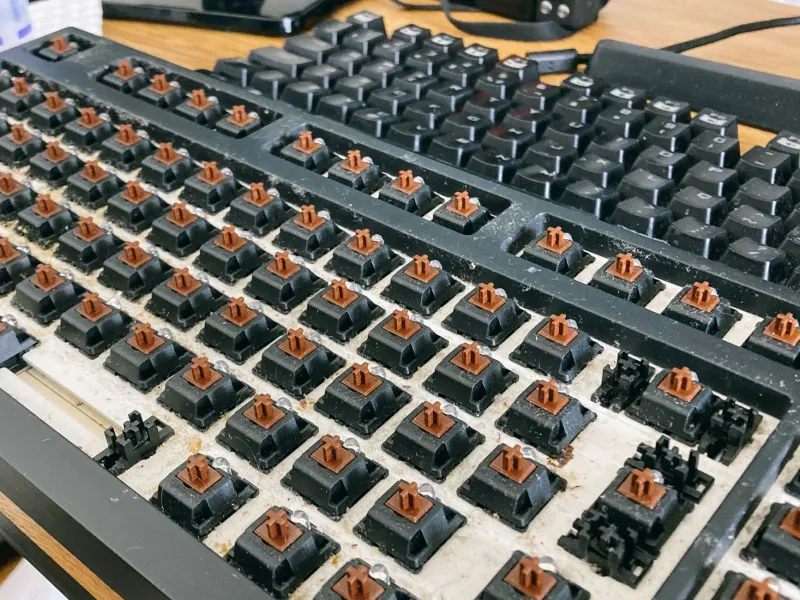
- Keycaps removed, showing the switches and stabilizers.
- The PCB under bright light, especially around hot-swap sockets and the USB port.
- The inside of the case, if the seller is comfortable opening it.
- A short video of every key registering in a text editor or keyboard tester.
- A handwritten note with the date next to the board, to prove the photos are current.
If the seller cannot provide basic photos, that is information. You do not need to be rude. You just need to move on.
Send a Short, Specific Questionnaire
Ask why they are selling, how long they have owned the board, and whether it has seen any spills. Ask about soldering, desoldering, and mods. Ask if every key works, including modifiers and function keys. Ask about chatter, double typing, and sticky switches. Ask whether the wireless dongle, cable, and original keycaps are included. For wireless boards, ask about battery health. For hot-swap boards, ask whether the sockets are tight. Ask about stripped screws, cracks, and case damage. A good seller will answer. A bad seller will get defensive.
Red Flags That Should End the Conversation
- Stock photos instead of real ones.
- No internal photos on a board with obvious mods.
- A seller who refuses protected payment or wants to move off-platform immediately.
- A price that is far below the market with a story about a sudden move.
- Missing dongles, proprietary cables, or keycaps on a board that needs them.
- Any mention of water damage, smoke damage, or a swollen battery.
- A cracked PCB, dead hot-swap sockets, or a USB port that wiggles.
- A seller who will not do a live video call or meet in a safe public place.
Test Before You Pay
If you meet in person, bring a laptop or phone and a keycap puller if you have one. Open a text editor and press every key. Test the modifiers, the function row, and any media keys. Wiggle the USB cable gently. Test wireless mode if the board supports it. Check the LEDs. Listen to the stabilizers on the spacebar, shift, and enter keys. Look at the case seams and screw holes. Smell the board. Smoke and mildew are hard to hide. If the seller will not let you test it, that is a no.
Clean It Before You Judge It
Once the board is yours, remove the keycaps and wash them in lukewarm water with a drop of dish soap. Dry them completely. Clean the case with a microfiber cloth and a little isopropyl alcohol. Use compressed air on the PCB, but do not drown it. If the stabilizers rattle, clean and relube them. Replace the cable if the old one is stiff or damaged. Check the screws and the USB port. A thorough cleaning will tell you more about the board than the first five minutes of typing.
When a Bargain Is a Money Pit
A cheap board becomes expensive when it needs a new PCB, a rare dongle, a custom battery, or a set of keycaps that costs more than the board. Vintage boards with proprietary parts can be lovely, but they are not a beginner's bargain. Water damage, cracked PCBs, and dead hot-swap sockets are usually not worth the repair unless the board is rare or you enjoy the project. Add up the purchase price, the parts, and your time. If the total is higher than a known-good used board, walk away.
The best used keyboard is not the cheapest one. It is the one whose problems you can see, price, and fix.