Four Keys, Five Minutes: A Prebuilt Keyboard's Stabilizers Spill the Whole Story

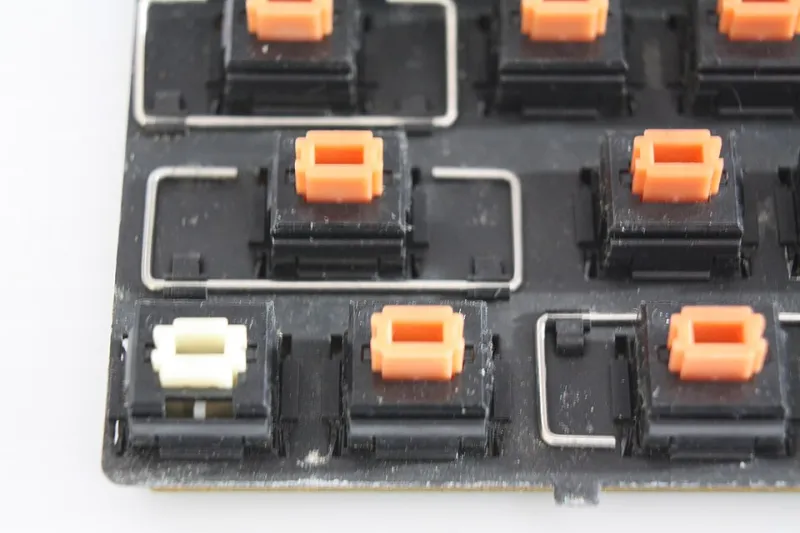
Photo: Giles Laurent, CC BY-SA 4.0, via Wikimedia Commons
Prebuilt keyboards are reviewed on switches, and switches are the least informative thing about them. Switches are commodity parts, spec-sheeted to death, and largely fine at every price point in 2026. Stabilizers are the opposite: tolerance-sensitive, awkward to assemble at volume, and impossible to hide. They are also the four keys you touch most — spacebar, Enter, Backspace, left Shift — which makes them a nearly perfect five-minute audit.
Do this at the store counter if the store allows it, or in the first hour after unboxing. Either way, before the window closes.
Why the Stabs Are the Tell
A stabilizer is two plastic housings, a bent metal wire, and a keycap sitting on top of a switch. Nothing about that is precision manufacturing, but everything about it is tolerance-dependent. The wire has to sit level. The housings have to be square to the plate. The keycap stems have to grab evenly. Any slop in any of those joints shows up as tick, rattle, or bind, and slop is exactly what a factory with a per-unit time budget is likely to leave behind.
A board with clean stabilizers almost always has someone paying attention upstream: the plate is square, the PCB is not warped, the case screws are all present. A board with ticking stabilizers may still be a great deal — but now you know where the corners were cut.
The Five-Minute Routine
Set the board flat on a surface similar to your desk. If you always use a desk mat, test on a desk mat. Sound changes with the surface under it, and you want a realistic read.
One: spacebar ends, then center. Press the far left end, then the far right end, then dead center, ten times each. Listen for a sharp tick on the way down and a second one on release. Feel for any difference in resistance between the two ends.
Two: slow release. Press the spacebar down and let it come up slowly with your finger still on the cap. Watch and feel whether both sides rise together. One side lagging, or the bar rocking visibly, is a real problem.
Three: the wiggle. Hold the spacebar down with one finger and gently rock the keycap side to side. A little play is normal. A hollow, loose clicking sound means the cap is not gripping the stems evenly, or the stems themselves are undersized.
Four: Enter, Backspace, left Shift. These smaller stabilized keys often use different hardware than the spacebar, and left Shift is the classic problem child — it is long, it sits at the edge of the plate, and it takes a beating. Type a few sentences with capitals, commas, and backspaces. Shift is the key you hit most in real work.
Five: type a full sentence, not random keys. Punctuation, numbers, at least four Enters. This is where you find out whether the spacebar is the only loud key or whether the whole stabilizer set is untuned.
Reading the Symptoms
Rattle on bottom-out. A loose, plasticky clatter when the key lands. Usually housing-to-plate tolerance or a dry factory stab. This is the most common and most fixable complaint.
Tick on release. A single sharp snap as the wire snaps back into place. That is the wire rattling inside the housing. Grease and a small strip of tape at the wire contact point will usually kill it.
Binding or a scratchy, gluey feel. The key resists slightly, especially when pressed off-center, and returns with a stutter. That points to a bent wire or a housing seated crookedly. It can be fixed, but it requires disassembly, and on a board you just bought it is a bad sign.
Uneven return. One side of the spacebar comes back slower than the other. Sometimes a warped keycap, sometimes a misaligned wire, occasionally a plate that is not flat.
Metallic ping. A ringing tone after each press. Wire vibration. It dies quickly with grease and a bit of foam in the cavity.
A spacebar that is dramatically louder than everything else. Mild version is normal on nearly every board. A hollow, cavernous clonk suggests an empty case, which is a design choice you can pad. A crack on every press suggests something is not seated.
Fix or Send It Back
Not every flaw deserves a return label. A quick decision rule:
Keep and tune if the symptoms are sound-only — tick, rattle, ping — and the key feels mechanically sound. Dielectric grease on the wire, a small tape mod at the wire contact, and a strip of foam in the cavity handle the overwhelming majority of these. Budget twenty minutes and eight dollars.
Keep if it is a keycap problem. Swap the spacebar for a spare and retest. If the noise follows the cap, the board is fine and the cap is warped — a five-dollar problem, or a warranty email.
Return if the key binds, if one side of the spacebar will not return evenly, or if the plate flexes visibly around the stabilizer when you press. Those are tolerance and assembly failures, not tuning failures, and you should not have to fix them on day one.
Check access first. If the stabs are screw-in and reachable without pulling the whole board apart, a fix is realistic. If they are plate-mount and buried under a soldered PCB with a warranty seal, weigh the effort before you decide to keep it.
Before the Window Closes
US return policies are shorter than people remember. Big-box retailers typically run fifteen to thirty days, boutique vendors often charge a restocking fee on assembled boards, and anything built to order may not be returnable at all. Check the policy the day the box arrives, not the day you get around to it.
Film a short phone video of the unboxing and the spacebar test. It is boring footage right up until it is the only evidence you have. Keep the original packaging for at least two weeks. And test with the keycaps the board shipped with before you swap anything — you want to know what the factory sent you, not what your spare set is covering up.
Five minutes, four keys, one honest answer. Spend it before the window shuts.